This sample shows how the FIZBS team approaches a full database design and SQL project. The SunCrest Hotels & Resorts brief asks students to model a 15-hotel chain, normalise a flat reservation export to third normal form, and then write MySQL queries, views, a stored function, a cursor-based procedure and a trigger.
Below you will find a summary of the brief, our Crow's Foot ER diagram, the key design decisions and a preview of the tested SQL. Only part of the solution is shown, and no personal details are included.
For reference only. This sample shows our approach and quality. Do not copy it or submit it as your own work. Personal details have been removed, and only part of the solution is shown.
- Category
- Computing, IT & Databases
- Subject
- Database Systems
- Level
- University course project
- Scope
- 7 parts, 36 SQL tasks
- Tools
- MySQL 8, Crow's Foot ERD, EER, Normalisation
What the brief asked for
- 1Part I: identify every entity, attribute and relationship in the business narrative, with cardinality and participation, and resolve the many-to-many link between reservations and services.
- 2Part II: draw a complete ER diagram in Chen or Crow's Foot notation, with written justification for two relationships.
- 3Part III: extend the model with an EER hierarchy for individual and corporate guests, including a negotiated rate relationship with hotels.
- 4Part IV: normalise a flat RESERVATION_RECORD relation through 1NF, 2NF and 3NF, and show that common anomalies are removed.
- 5Part V: justify primary keys, NOT NULL and UNIQUE constraints, and explain entity integrity versus referential integrity.
- 6Part VI: write 25 business queries and 5 challenge queries using joins, subqueries, indexes and views on a ready-made 10-table MySQL database.
- 7Part VII: advanced SQL with single-row and group functions, set operators, a stored function, a stored procedure with a cursor and handler, and an audit trigger.
Step 1: Entities and primary keys
We read the narrative line by line and turned every "thing the business needs to remember" into an entity. Each one gets a surrogate primary key so that rows can be referenced safely, even when natural values such as room numbers repeat.
HOTEL
- What it represents
- One SunCrest property with its name, location, star rating and on-site manager
- Primary key
- HotelID
ROOM_TYPE
- What it represents
- A shared category such as Standard, Deluxe or Suite, with a base nightly rate and maximum occupancy
- Primary key
- RoomTypeID
ROOM
- What it represents
- One physical room in one hotel; numbers like "101" repeat across hotels
- Primary key
- RoomID
GUEST
- What it represents
- A person with a profile, contact details and a loyalty tier
- Primary key
- GuestID
EMPLOYEE
- What it represents
- A staff member who works at exactly one hotel
- Primary key
- EmployeeID
RESERVATION
- What it represents
- One booking of one room for a date range, handled by one employee
- Primary key
- ReservationID
PAYMENT
- What it represents
- The single payment record for a non-cancelled reservation
- Primary key
- PaymentID
SERVICE
- What it represents
- An optional extra from the shared catalogue, such as spa, dining or transport
- Primary key
- ServiceID
RESERVATION_SERVICE
- What it represents
- Associative entity: which services were ordered during a stay, and how many
- Primary key
- ReservationServiceID
REVIEW
- What it represents
- One optional post-stay review tied to a reservation and a guest
- Primary key
- ReviewID
| Entity | What it represents | Primary key |
|---|---|---|
| HOTEL | One SunCrest property with its name, location, star rating and on-site manager | HotelID |
| ROOM_TYPE | A shared category such as Standard, Deluxe or Suite, with a base nightly rate and maximum occupancy | RoomTypeID |
| ROOM | One physical room in one hotel; numbers like "101" repeat across hotels | RoomID |
| GUEST | A person with a profile, contact details and a loyalty tier | GuestID |
| EMPLOYEE | A staff member who works at exactly one hotel | EmployeeID |
| RESERVATION | One booking of one room for a date range, handled by one employee | ReservationID |
| PAYMENT | The single payment record for a non-cancelled reservation | PaymentID |
| SERVICE | An optional extra from the shared catalogue, such as spa, dining or transport | ServiceID |
| RESERVATION_SERVICE | Associative entity: which services were ordered during a stay, and how many | ReservationServiceID |
| REVIEW | One optional post-stay review tied to a reservation and a guest | ReviewID |
Entities identified from the SunCrest narrative
The narrative hides one many-to-many relationship: a reservation can include many services, and a service can be ordered on many reservations. Because the link carries its own data (Quantity and ServiceDate), we resolve it with the associative entity RESERVATION_SERVICE instead of a simple foreign key.
Step 2: Relationships, cardinality and participation
Every cardinality and participation choice is backed by a clause from the brief. Markers give partial credit for correct answers without justification, so this column matters as much as the diagram.
HOTEL contains ROOM
- Cardinality
- 1:N
- Participation
- Total on both sides
- Business rule used
- "Each hotel contains many rooms"; a room cannot exist outside a hotel
HOTEL employs EMPLOYEE
- Cardinality
- 1:N
- Participation
- Total on both sides
- Business rule used
- "Each employee works at exactly one hotel; a hotel employs many staff"
GUEST makes RESERVATION
- Cardinality
- 1:N
- Participation
- Partial for GUEST, total for RESERVATION
- Business rule used
- A profile can exist before any booking, but every reservation belongs to one guest
RESERVATION generates PAYMENT
- Cardinality
- 1:0..1
- Participation
- Partial for RESERVATION, total for PAYMENT
- Business rule used
- Cancelled reservations have no payment; every payment belongs to one reservation
RESERVATION receives REVIEW
- Cardinality
- 1:0..1
- Participation
- Partial for RESERVATION, total for REVIEW
- Business rule used
- A review is optional and is tied to one specific stay
| Relationship | Cardinality | Participation | Business rule used |
|---|---|---|---|
| HOTEL contains ROOM | 1:N | Total on both sides | "Each hotel contains many rooms"; a room cannot exist outside a hotel |
| HOTEL employs EMPLOYEE | 1:N | Total on both sides | "Each employee works at exactly one hotel; a hotel employs many staff" |
| GUEST makes RESERVATION | 1:N | Partial for GUEST, total for RESERVATION | A profile can exist before any booking, but every reservation belongs to one guest |
| RESERVATION generates PAYMENT | 1:0..1 | Partial for RESERVATION, total for PAYMENT | Cancelled reservations have no payment; every payment belongs to one reservation |
| RESERVATION receives REVIEW | 1:0..1 | Partial for RESERVATION, total for REVIEW | A review is optional and is tied to one specific stay |
Selected relationships with justification
Step 3: The ER diagram (Crow's Foot notation)
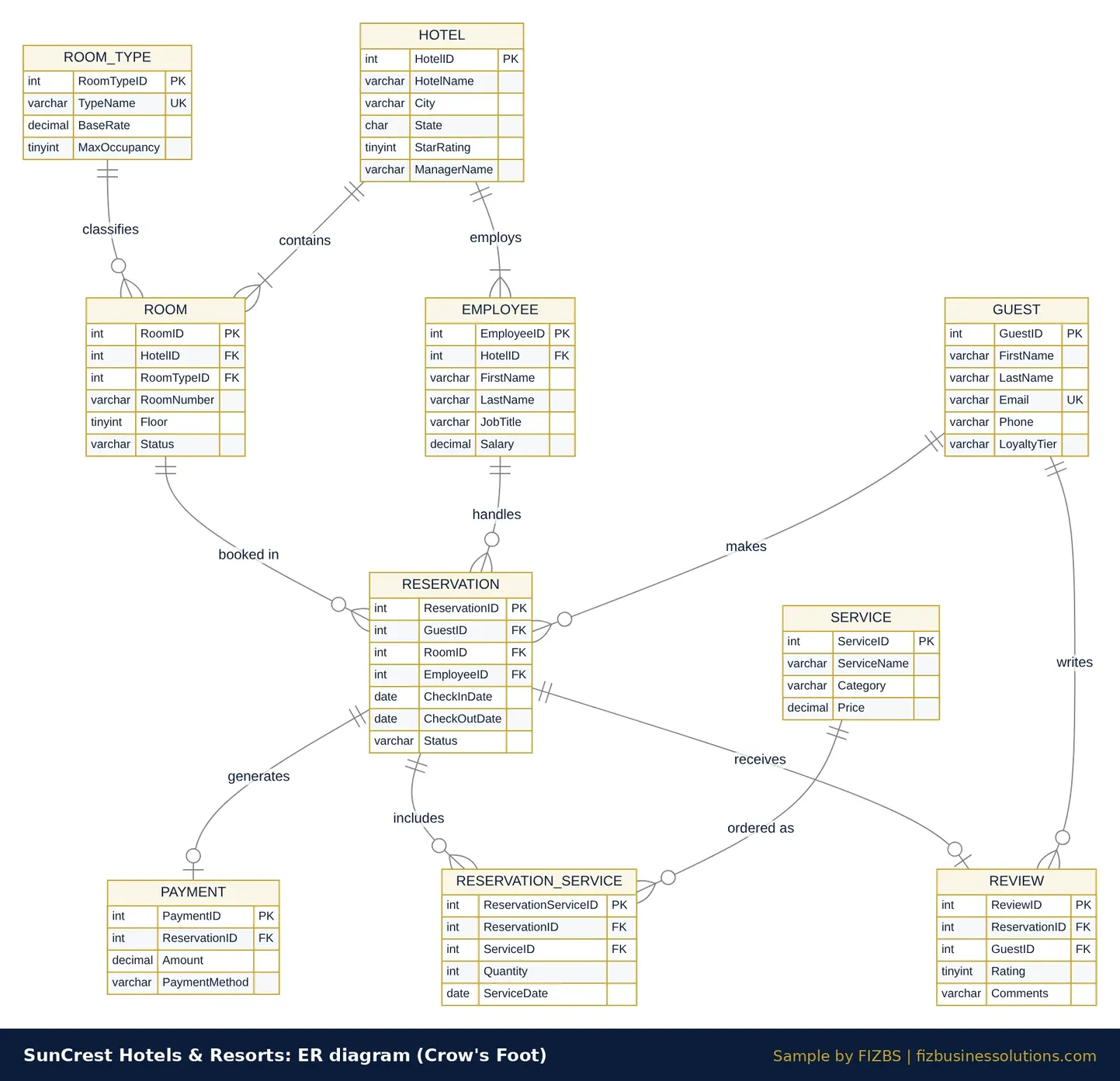
We used Crow's Foot notation consistently, as the brief requires. Look at the link between RESERVATION and PAYMENT: the double bar on the reservation side and the circle on the payment side say that every payment needs a reservation, but a cancelled reservation has none. The same pattern applies to REVIEW.
Step 4: EER extension for individual and corporate guests
- The specialisation of GUEST is total (every guest must be Individual or Corporate) and disjoint (a guest cannot be both), so it is drawn with a double line and a "d" in the circle.
- INDIVIDUAL_GUEST adds only DateOfBirth, GovernmentIDNumber and PreferredContactMethod. Inherited attributes such as Email and LoyaltyTier are not redrawn.
- CORPORATE_GUEST adds CompanyName, TaxID, BillingContactName and BillingContactEmail.
- NEGOTIATED_RATE is an M:N relationship between CORPORATE_GUEST and HOTEL with the attributes DiscountPct and ContractStartDate. The discount varies by hotel, so it belongs on the relationship, not on the guest.
Why not draw NEGOTIATED_RATE from GUEST? It would suggest that individual travellers can hold corporate contracts, which the business rules forbid. Placing it on the subtype makes the rule visible in the diagram itself.
Step 5: Normalising RESERVATION_RECORD to 3NF
The flat export breaks 1NF because services_booked holds a comma-separated list (for example "Late Checkout, Parking - Valet"). We moved each service onto its own row, which gives a composite key of (reservation_id, service_name).
In 1NF, every reservation column depends on reservation_id alone, which is a partial dependency on the composite key, so 2NF separates the reservation data from the service rows. 3NF then removes the transitive dependencies through guest_id, hotel_id, employee_id and (hotel_id, room_number) to room_type to base_rate.
GUEST
- Primary key
- guest_id
- Foreign keys
- None
- Other attributes
- guest_name, guest_email, guest_phone, guest_city, guest_state, loyalty_tier
HOTEL
- Primary key
- hotel_id
- Foreign keys
- None
- Other attributes
- hotel_name, hotel_city, hotel_state
ROOM_TYPE
- Primary key
- room_type
- Foreign keys
- None
- Other attributes
- base_rate
ROOM
- Primary key
- (hotel_id, room_number)
- Foreign keys
- hotel_id → HOTEL, room_type → ROOM_TYPE
- Other attributes
- None
EMPLOYEE
- Primary key
- employee_id
- Foreign keys
- None
- Other attributes
- employee_name, employee_job_title
RESERVATION
- Primary key
- reservation_id
- Foreign keys
- guest_id, (hotel_id, room_number), employee_id
- Other attributes
- booking_date, checkin_date, checkout_date, status, payment_amount, payment_method
RESERVATION_SERVICE
- Primary key
- (reservation_id, service_name)
- Foreign keys
- reservation_id → RESERVATION
- Other attributes
- None
| Table | Primary key | Foreign keys | Other attributes |
|---|---|---|---|
| GUEST | guest_id | None | guest_name, guest_email, guest_phone, guest_city, guest_state, loyalty_tier |
| HOTEL | hotel_id | None | hotel_name, hotel_city, hotel_state |
| ROOM_TYPE | room_type | None | base_rate |
| ROOM | (hotel_id, room_number) | hotel_id → HOTEL, room_type → ROOM_TYPE | None |
| EMPLOYEE | employee_id | None | employee_name, employee_job_title |
| RESERVATION | reservation_id | guest_id, (hotel_id, room_number), employee_id | booking_date, checkin_date, checkout_date, status, payment_amount, payment_method |
| RESERVATION_SERVICE | (reservation_id, service_name) | reservation_id → RESERVATION | None |
Final tables in third normal form
Anomaly check: a new room type can now be added to ROOM_TYPE before any physical room exists, a hotel's details are updated in one HOTEL row, and removing an employee no longer deletes reservation history once their bookings are reassigned.
Step 6: Tested SQL query preview
All SQL below was run against a MySQL-compatible server using the 10-table SunCrest schema from the brief. We use explicit JOINs and short, consistent aliases so a marker can follow the logic quickly.
SELECT h.HotelName,
       SUM(p.Amount) AS TotalRevenue
FROM HOTEL h
JOIN ROOM r          ON r.HotelID = h.HotelID
JOIN RESERVATION res ON res.RoomID = r.RoomID
JOIN PAYMENT p       ON p.ReservationID = res.ReservationID
GROUP BY h.HotelID, h.HotelName
ORDER BY TotalRevenue DESC;SELECT CONCAT(g.FirstName, ' ', g.LastName) AS FullName,
g.Email
FROM GUEST g
WHERE NOT EXISTS (
SELECT 1
FROM RESERVATION r
WHERE r.GuestID = g.GuestID
);NOT EXISTS is a safer choice than NOT IN here, because NOT IN returns no rows at all if the subquery ever produces a NULL.
CREATE VIEW vw_hotel_revenue_summary AS
SELECT h.HotelID,
       h.HotelName,
       COUNT(DISTINCT res.ReservationID) AS TotalReservations,
       COALESCE(SUM(p.Amount), 0)        AS TotalRevenue,
       ROUND(AVG(p.Amount), 2)           AS AvgPaymentAmount
FROM HOTEL h
JOIN ROOM r          ON r.HotelID = h.HotelID
JOIN RESERVATION res ON res.RoomID = r.RoomID
LEFT JOIN PAYMENT p  ON p.ReservationID = res.ReservationID
GROUP BY h.HotelID, h.HotelName;

SELECT HotelName, TotalReservations, TotalRevenue
FROM vw_hotel_revenue_summary
WHERE TotalRevenue > (
  SELECT AVG(TotalRevenue)
  FROM vw_hotel_revenue_summary
)
ORDER BY TotalRevenue DESC;
TotalReservations counts every booking, including cancelled ones, while revenue only includes reservations that generated a payment. The LEFT JOIN keeps cancelled bookings in the count instead of silently dropping them.
SELECT CONCAT(g.FirstName, ' ', g.LastName) AS GuestName,
       g.State,
       SUM(p.Amount) AS TotalSpending
FROM GUEST g
JOIN RESERVATION r ON r.GuestID = g.GuestID
JOIN PAYMENT p     ON p.ReservationID = r.ReservationID
GROUP BY g.GuestID, g.FirstName, g.LastName, g.State
HAVING SUM(p.Amount) > (
  -- correlated: average spending of paying guests in the SAME state
  SELECT SUM(p2.Amount) / COUNT(DISTINCT g2.GuestID)
  FROM GUEST g2
  JOIN RESERVATION r2 ON r2.GuestID = g2.GuestID
  JOIN PAYMENT p2     ON p2.ReservationID = r2.ReservationID
  WHERE g2.State = g.State
)
ORDER BY g.State, TotalSpending DESC;
Step 7: Advanced SQL programming preview
DELIMITER $$
CREATE FUNCTION fn_nights_stayed(p_reservation_id INT)
RETURNS INT
READS SQL DATA
BEGIN
  DECLARE v_nights INT;

  SELECT DATEDIFF(CheckOutDate, CheckInDate)
    INTO v_nights
  FROM RESERVATION
  WHERE ReservationID = p_reservation_id;

  RETURN v_nights;
END$$
DELIMITER ;

SELECT r.ReservationID,
       fn_nights_stayed(r.ReservationID) AS NightsStayed
FROM RESERVATION r
JOIN ROOM rm ON rm.RoomID = r.RoomID
WHERE r.Status = 'Checked-Out'
AND rm.HotelID = 2;DELIMITER $$
CREATE PROCEDURE sp_apply_loyalty_upgrades(IN p_threshold DECIMAL(10,2))
BEGIN
DECLARE v_done INT DEFAULT 0;
DECLARE v_guest_id INT;
DECLARE v_tier VARCHAR(10);
DECLARE v_spending DECIMAL(12,2);
DECLARE v_next_tier VARCHAR(10);
-- (1) cursor: each guest, current tier and lifetime spending
DECLARE cur_guests CURSOR FOR
SELECT g.GuestID, g.LoyaltyTier, COALESCE(SUM(p.Amount), 0)
FROM GUEST g
LEFT JOIN RESERVATION r ON r.GuestID = g.GuestID
LEFT JOIN PAYMENT p ON p.ReservationID = r.ReservationID
GROUP BY g.GuestID, g.LoyaltyTier;
-- (2) handler: set the done flag when the cursor runs out of rows
DECLARE CONTINUE HANDLER FOR NOT FOUND SET v_done = 1;
OPEN cur_guests;
-- (3) loop through every guest
guest_loop: LOOP
FETCH cur_guests INTO v_guest_id, v_tier, v_spending;
IF v_done = 1 THEN
LEAVE guest_loop;
END IF;
-- (4) upgrade exactly one level, never downgrade, skip Platinum
IF v_spending >= p_threshold AND v_tier <> 'Platinum' THEN
SET v_next_tier = CASE v_tier
WHEN 'None' THEN 'Silver'
WHEN 'Silver' THEN 'Gold'
WHEN 'Gold' THEN 'Platinum'
END;
UPDATE GUEST
SET LoyaltyTier = v_next_tier
WHERE GuestID = v_guest_id;
END IF;
END LOOP guest_loop;
-- (5) close the cursor
CLOSE cur_guests;
END$$
DELIMITER ;
CALL sp_apply_loyalty_upgrades(1500.00);Each numbered comment maps to one requirement in the brief, which makes the marking easy to follow. The cursor uses LEFT JOINs so guests with no spending are still checked, and the CASE expression moves a guest up exactly one tier.
CREATE TABLE AUDIT_LOG (
  LogID         INT AUTO_INCREMENT PRIMARY KEY,
  PaymentID     INT,
  ReservationID INT,
  Amount        DECIMAL(10,2),
  LoggedAt      DATETIME
);

CREATE TRIGGER trg_payment_audit
AFTER INSERT ON PAYMENT
FOR EACH ROW
  INSERT INTO AUDIT_LOG (PaymentID, ReservationID, Amount, LoggedAt)
  VALUES (NEW.PaymentID, NEW.ReservationID, NEW.Amount, NOW());

-- Test: add a payment against a cancelled reservation (it has no payment yet)
INSERT INTO PAYMENT (PaymentID, ReservationID, PaymentDate, Amount, PaymentMethod)
SELECT 9001, ReservationID, CURDATE(), 150.00, 'Credit Card'
FROM RESERVATION
WHERE Status = 'Cancelled'
ORDER BY ReservationID
LIMIT 1;

SELECT * FROM AUDIT_LOG;
What a complete answer to this brief includes
- ER and EER diagrams with a written justification for each cardinality and participation choice.
- Step-by-step 1NF, 2NF and 3NF tables with every functional dependency labelled as partial or transitive.
- Primary key, NOT NULL and UNIQUE constraints justified with business rules from the scenario.
- 25 business queries and 5 challenge queries, each with three rows of output as the brief requests.
- F1 to F6: single-row and group functions, UNION, UNION ALL, INTERSECT and EXCEPT, the stored function, procedure and trigger.
- A short approach note that states any assumptions made about the business rules.
Common mistakes in database projects like this
- Treating services_booked as a functional dependency, when it is really a many-to-many relationship.
- Using RoomNumber alone as a key, even though room "101" exists in every hotel.
- Drawing NEGOTIATED_RATE from GUEST instead of CORPORATE_GUEST.
- Using NOT IN with a subquery that can return NULL, which silently returns no rows.
- Leaving out READS SQL DATA or DETERMINISTIC on a MySQL function, which causes error 1418 when binary logging is on.
- Writing a cursor loop without a NOT FOUND handler, so the procedure fails with error 1329 after the last row.