Quick answer
The right statistical test depends on your research question and your variable types. Use t-tests or ANOVA to compare group means, correlation or chi-square to test relationships, and regression to predict an outcome. If your data breaks the assumptions of these parametric tests, use a non-parametric alternative such as Mann-Whitney or Kruskal-Wallis.
"Which statistical test should I use?" is probably the most common question students ask once their data is sitting in SPSS. Your supervisor wants "appropriate inferential statistics", the Analyze menu offers dozens of options, and picking the wrong one is a quick way to lose marks in a results chapter.
The choice is far less mysterious than it looks. It depends on three things: what your research question asks (difference, relationship or prediction), what type of variables you have, and whether your data meets a few assumptions. This guide walks you through that decision, gives you a decision table, shows the SPSS menu path for each test and explains how to report results in APA 7 style.
Step 1: Identify what your research question is asking
Write your research question or hypothesis down and ask what kind of answer it needs. Almost every student project falls into one of these families.
- Differences between groups: "Do male and female employees differ in job satisfaction?" This leads to t-tests, ANOVA and their non-parametric alternatives.
- Relationships: "Is there a relationship between study hours and exam score?" This leads to Pearson or Spearman correlation.
- Prediction: "Do price, quality and brand image predict purchase intention?" This leads to linear regression (continuous outcome) or logistic regression (yes/no outcome).
- Associations between categories: "Is gender associated with preferred payment method?" With two categorical variables, this leads to the chi-square test of independence.
Tip: If your hypothesis says "difference", think t-test or ANOVA. If it says "relationship" or "association", think correlation or chi-square. If it says "predict" or "influence", think regression.
Step 2: Work out your variable types
Next, identify the level of measurement of your dependent variable (the outcome) and independent variable (the grouping or predictor variable). Setting the Measure column in Variable View does not choose the test for you.
- Nominal: categories with no order, such as gender or department.
- Ordinal: ordered categories, such as education level or a single Likert item.
- Scale (interval or ratio): meaningful numbers, such as age, income or test score.
- Composite Likert scores (the mean of several items measuring one construct) are usually treated as scale data in social science research. A single Likert item is safer to treat as ordinal.
- If your independent variable is categorical, count the groups (two, or three or more) and decide whether they are independent (different people) or related (the same people measured more than once). This decides, for example, between an independent-samples and a paired-samples t-test.
Step 3: Check the assumptions of parametric tests
Parametric tests (t-tests, ANOVA, Pearson correlation, linear regression) are more powerful but rely on assumptions. When these are seriously violated, use a non-parametric alternative that works with ranks.
- Scale dependent variable measured at interval or ratio level.
- Approximate normality within each group (or of the residuals in regression). Check histograms, Q-Q plots and the Shapiro-Wilk test via Analyze > Descriptive Statistics > Explore, then Plots > Normality plots with tests.
- Homogeneity of variance: Levene's test appears automatically in the independent-samples t-test output and is an option in One-Way ANOVA.
- Independence of observations, no extreme outliers (check boxplots) and, for Pearson and regression, a roughly linear relationship on a scatterplot.
Tip: With larger samples (a common rule of thumb is around 30 or more per group), t-tests and ANOVA are fairly robust to mild non-normality, and Shapiro-Wilk can flag trivial departures. Look at the plots as well as the p value, and explain your decision in your methodology.
Which statistical test should I use? The decision table
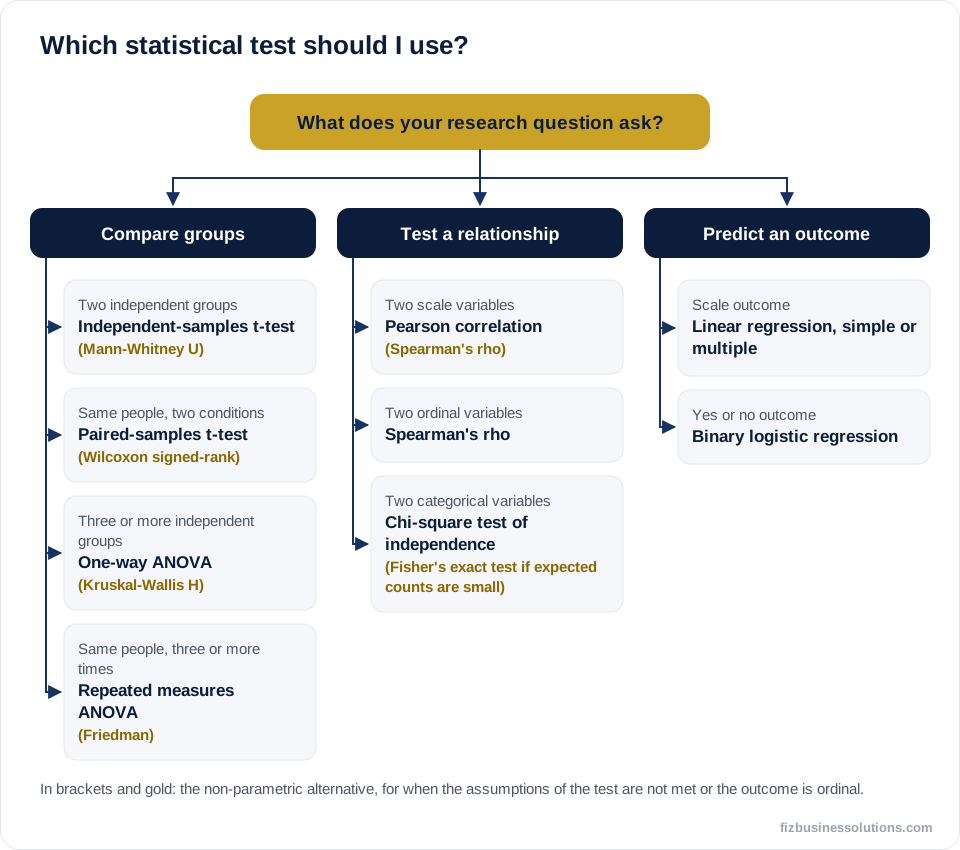
Find the line that matches your question, outcome and groups. The non-parametric alternative is in brackets for when assumptions are not met or the outcome is ordinal.
- One sample mean vs a known value: one-sample t-test (Wilcoxon signed-rank).
- Two independent groups, scale outcome: independent-samples t-test (Mann-Whitney U).
- Same people, two time points or conditions: paired-samples t-test (Wilcoxon signed-rank).
- Three or more independent groups: one-way ANOVA with post hoc tests (Kruskal-Wallis H).
- Same people, three or more time points: repeated measures ANOVA (Friedman).
- Two categorical independent variables and their interaction: two-way (factorial) ANOVA.
- Two scale variables: Pearson correlation (Spearman's rho).
- Two ordinal variables: Spearman's rho.
- Two categorical variables: chi-square test of independence (Fisher's exact test if expected counts are too small).
- Predict a scale outcome: simple or multiple linear regression.
- Predict a yes/no outcome: binary logistic regression.
Comparing groups: t-tests and ANOVA in SPSS
In some recent versions of SPSS the Compare Means menu is labelled Compare Means and Proportions; the tests sit in the same place.
Independent-samples t-test
Analyze > Compare Means > Independent-Samples T Test. Move the outcome into Test Variable(s) and the grouping variable into Grouping Variable, then click Define Groups and enter the codes (for example 1 and 2). If Levene's test is significant (p < .05), read the "Equal variances not assumed" row (Welch's t-test).
Paired-samples t-test
Analyze > Compare Means > Paired-Samples T Test, then move the two variables (for example pre and post) into Paired Variables as one pair.
One-way ANOVA
Analyze > Compare Means > One-Way ANOVA. Add the outcome to Dependent List and the group variable to Factor. Under Options tick Descriptive and Homogeneity of variance test (and Welch if variances are unequal). Under Post Hoc choose Tukey for equal variances or Games-Howell for unequal variances.
Two-way and repeated measures ANOVA
For two grouping variables use Analyze > General Linear Model > Univariate. For three or more measurements on the same people use Analyze > General Linear Model > Repeated Measures and check Mauchly's test of sphericity; if it is violated, report the Greenhouse-Geisser correction.
Relationships and associations: correlation and chi-square
Pearson vs Spearman correlation
Pearson's r measures a linear relationship between two roughly normal scale variables. Spearman's rho uses ranks, so it suits ordinal data, non-normal data, outliers or relationships that rise or fall consistently but not in a straight line. Both range from -1 to +1; Cohen's common guide treats .10 as small, .30 as medium and .50 as large.
In SPSS: Analyze > Correlate > Bivariate, move both variables into Variables and tick Pearson, Spearman or both. Draw a scatterplot first (Graphs > Chart Builder). Correlation does not show cause, so write "was associated with", not "caused".
Chi-square test of independence
Analyze > Descriptive Statistics > Crosstabs. Put one variable in Row(s) and the other in Column(s). Under Statistics tick Chi-square and Phi and Cramer's V; under Cells tick Expected counts and percentages.
A common rule is that no more than 20% of cells should have an expected count below 5. SPSS reports this under the Chi-Square Tests table. For a 2 x 2 table with small expected counts, report Fisher's exact test, shown in the same table. For a goodness-of-fit test on one variable, use Analyze > Nonparametric Tests > Legacy Dialogs > Chi-square.
Prediction: linear and logistic regression
Regression estimates how much an outcome changes as each predictor changes, while controlling for the others. It is popular in business and management dissertations testing a conceptual model.
- Linear regression: Analyze > Regression > Linear. Put the outcome in Dependent and predictors in Independent(s). Under Statistics tick Estimates, Model fit, Collinearity diagnostics and Durbin-Watson; under Plots request a histogram and normal probability plot of standardised residuals.
- Check linearity, independence of errors (Durbin-Watson roughly between 1.5 and 2.5 is a common guide), homoscedasticity, normal residuals and multicollinearity (VIF well below 10, many authors prefer below 5).
- Read R squared, the ANOVA table (is the model significant?) and the Coefficients table (B, Beta and p for each predictor). Code categorical predictors as dummy variables (0 and 1).
- Binary logistic regression: Analyze > Regression > Binary Logistic. Report odds ratios, shown as Exp(B), with confidence intervals.
Non-parametric alternatives in SPSS
Non-parametric tests compare ranks rather than means. They make fewer assumptions but have slightly less power. The Legacy Dialogs route is the simplest.
- Mann-Whitney U: Analyze > Nonparametric Tests > Legacy Dialogs > 2 Independent Samples.
- Wilcoxon signed-rank: Analyze > Nonparametric Tests > Legacy Dialogs > 2 Related Samples.
- Kruskal-Wallis H: Analyze > Nonparametric Tests > Legacy Dialogs > K Independent Samples, then follow up with pairwise Mann-Whitney tests using a Bonferroni-adjusted alpha.
- Friedman: Analyze > Nonparametric Tests > Legacy Dialogs > K Related Samples.
Tip: Report medians and interquartile ranges with non-parametric tests, not means. If your output is getting tangled, the FIZBS SPSS team can check your test choice with you over WhatsApp.
How to report your results in APA 7 style
In APA 7, italicise statistical symbols (t, F, p, r, M, SD); give exact p values to two or three decimals but write p < .001 for very small values; drop the leading zero for values that cannot exceed 1 (p, r, Beta) but keep it for others (d = 0.79); and always add an effect size. The numbers below are illustrative.
- t-test: "International students (M = 3.82, SD = 0.61) reported higher stress than home students (M = 3.31, SD = 0.68), t(38) = 2.45, p = .019, d = 0.79."
- ANOVA: "Satisfaction differed across the three branches, F(2, 57) = 4.21, p = .020, η² = .13."
- Chi-square: "Gender was associated with preferred payment method, χ²(1, N = 120) = 6.34, p = .012, φ = .23."
- Correlation: "Study hours were positively correlated with exam score, r(48) = .42, p = .002."
- Regression: "The model explained 31% of the variance in purchase intention, R² = .31, F(2, 97) = 21.60, p < .001."
- Mann-Whitney U: "Satisfaction was higher in Group A (Mdn = 4) than Group B (Mdn = 3), U = 120.50, z = -2.31, p = .021."
Tip: Do not paste raw SPSS tables into your dissertation. Rebuild them as APA tables (bold table number, italic title, no vertical lines) and comment on them in the text.
Common mistakes when choosing a statistical test
- Running several t-tests instead of one ANOVA for three or more groups, which inflates false positives.
- Using an independent-samples t-test on before-and-after data (it should be paired).
- Running chi-square on means or percentages instead of raw counts.
- Reporting p values with no effect size or descriptive statistics.
- Choosing a test because it gives p < .05. Plan your analysis from your research questions first.
Need help with your SPSS analysis?
If you are still unsure which statistical test to use, FIZ Business Solutions (FIZBS) can help. Our experts hold Master's and PhD qualifications and have supported students since 2015 with choosing tests, checking assumptions, interpreting output and writing up results in APA style.
Message us on WhatsApp 24/7 or book a WhatsApp call with an expert before ordering. Support starts from £20 per 1,000 words, with 10% off your first order, and everything is 100% confidential.